
“Insufficient storage space”: four very annoying words when you want to download a new application, a video or simply take a few photos with your smartphone. To continue to enjoy your phone in the best conditions, you must free up storage space. Here are the solutions to scrape the few precious Gigabytes you are missing on your Android smartphone.
Uninstall apps that are taking up your storage space
If the internal memory of your smartphone is full, it may be, first of all, that it accommodates too many applications. A little cleaning of the apps that you no longer use should allow you to free up space on your phone. To do this, simply go to the settings menu of your Android smartphone, then to the applications section. There you will find all the installed apps, and perhaps some that you no longer need. Select the unwanted applications then press “uninstall”: this will certainly allow you to have more storage available.
Note that certain pre-installed applications cannot be deleted, but simply deactivated, which will however allow all their updates to be deleted, and save a little storage space.
Clear app caches to save more space
Chrome, Firefox, Facebook, Twitter and many other applications store cached data. This is a short-term memory which prevents the app from downloading a certain amount of information each time it is used. Emptying this cache at regular intervals will free up space on the internal memory of your Android smartphone, and this will not prevent your application from working correctly. On the contrary: this one-off cleaning will be rather beneficial, because it will eliminate the slowdowns linked to the accumulation of obsolete data and errors in the cache.
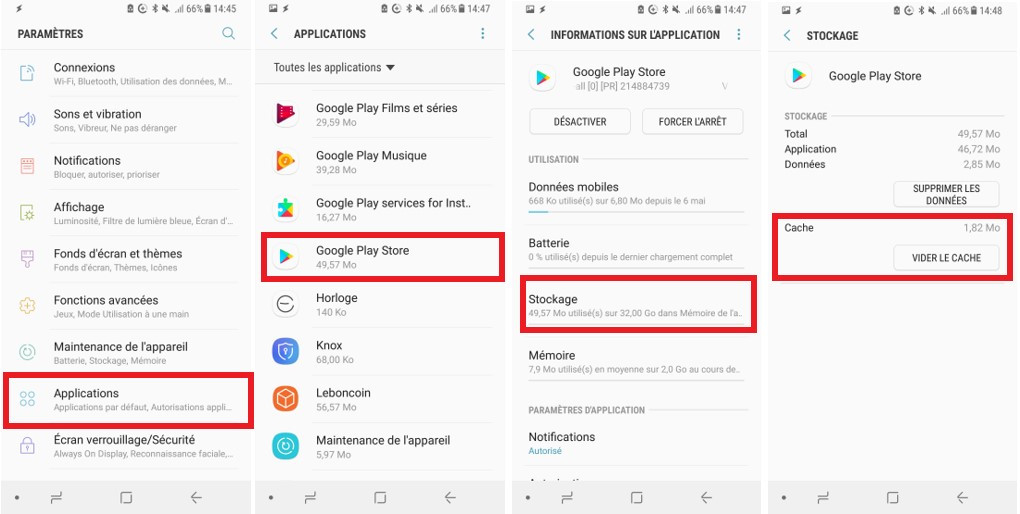
To clean up, go to the settings menu of your Android phone, then to the applications section. You can then select them one by one to find out if cached data can be advantageously deleted.
Clear app data, optional
During this consultation of each application in detail, you will undoubtedly notice that some contain a large amount of data in storage, sometimes several gigabytes. It is possible to “delete application data” to save space on your Android, as we can see above (last capture on the right, above the red frame).
But be careful: at your own risk. This willdelete all account information and other datastored through these services. Downloaded music and videos, GPS maps, or even game backups… This possibility should therefore only be used if you are certain that you no longer need the application and all the information that it will have stored on your smartphone’s memory.
Download: clean up to save storage
Other elements can still be deleted to free up storage on Android: these files that we have downloaded over time and which are no longer of any use. Those that we have even saved – forms, purchase orders, images – and that we can choose to delete manually via a file manager, like on a computer. Or content downloaded from applications for offline use. Take a look atNetflix, Spotify, Google Maps, Wazeand others to delete films, series, music or maps that will no longer be useful to you…
Delete unnecessary files to save space
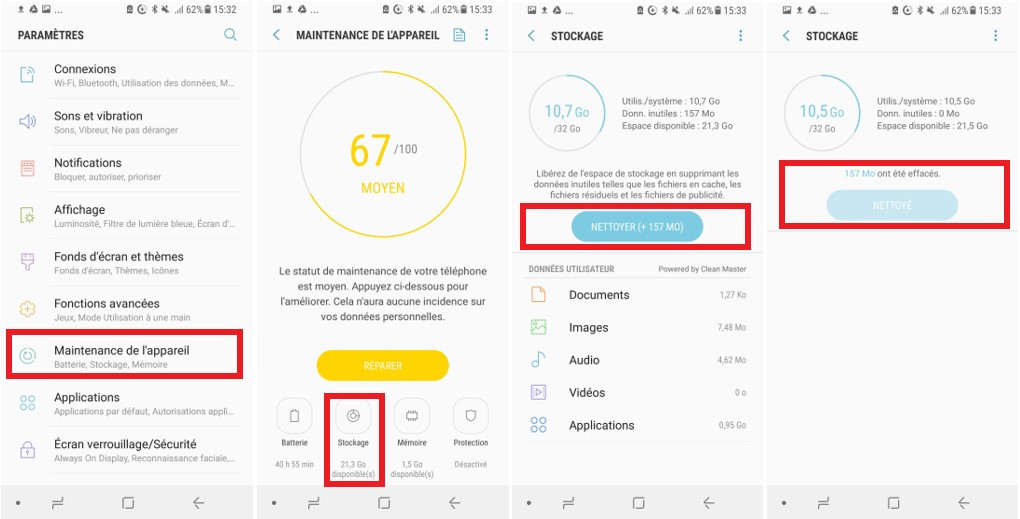
But the big cleanup doesn’t stop there. To save space on your Android smartphone, you can also get rid of unwanted elements accumulated on your smartphone, when using applications for example. These are more difficult to identify for manual removal. The most recent devices offer a cleaning mode which will regularly make room. This function will detect and eliminate unnecessary files, without affecting your precious data (photos, backups, etc.). Example here on a Samsung smartphone running Android 7.
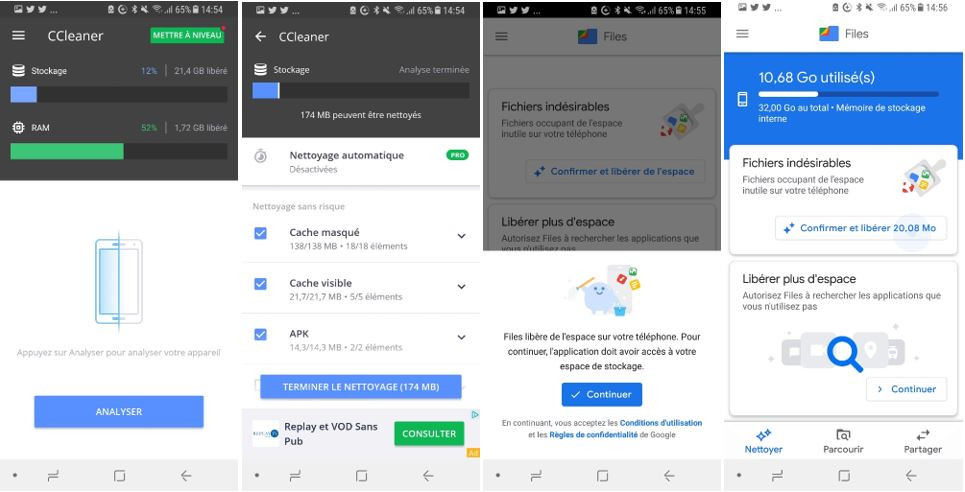
Older terminals can be cleaned using a dedicated application. Let us cite, among the best known, Ccleaner (captures on the left below) or Google Files (capture on the right). These tools will allow you to very simply eliminate unnecessary data and free up storage space on your Android. They will also be responsible for purging the caches, thus avoiding having to manually carry out the operation described above.
SD card and cloud to free up space on your smartphone
Finally, if your internal memory is overflowing with data that you do not wish to part with, there is still the possibility of transferring them to an external storage space, either using an SD card, which will allow you to save photos, music or other files locally. And possibly, on relatively recent phones (Android 6.0 minimum), to transfer or install applications and their data, which will however require unifying the SD card with the phone’s internal memory.
Another option to consider, finally, to increase the available space: back up your files in the cloud using one of the many online storage services. With the advantage of being able to access it from all your devices, and to be sure not to lose them in the event of a problem with your smartphone (loss, breakage, theft, etc.). While making sure to opt for a secure solution, particularly if you plan to save personal or sensitive data…

